
How to A/B Test Your YouTube Thumbnails (2026 Guide to YouTube's Built-In Tool)
Most YouTube thumbnail A/B testing guides were written when third-party tools were the only option. YouTube has since shipped its own Test and Compare feature inside YouTube Studio. It's better than any third-party alternative for one reason: it tests against your actual audience's click behavior on your actual video, not a panel, not a simulation, not a time-rotation hack.
This guide covers how YouTube's native thumbnail test works, who has access, how to set it up, and how to use it with 1of10 to generate test-ready variants without spending hours in a design tool.
What is YouTube thumbnail A/B testing (YouTube Studio's native Test and Compare feature)
YouTube's Test and Compare feature lets you upload up to 3 thumbnail variants for a single video. YouTube serves each variant to a portion of your audience and measures click-through rate. When statistical significance is reached, YouTube identifies the winner and can automatically apply the winning thumbnail.
Key facts about how it works:
- Tests run on real viewers surfaced in their feed -- not a panel
- YouTube measures CTR across all variants simultaneously (not time-rotated)
- The test runs automatically after you upload variants and click Run Test
- No third-party integration required, no additional cost
- You can review results mid-test or let YouTube auto-apply the winner
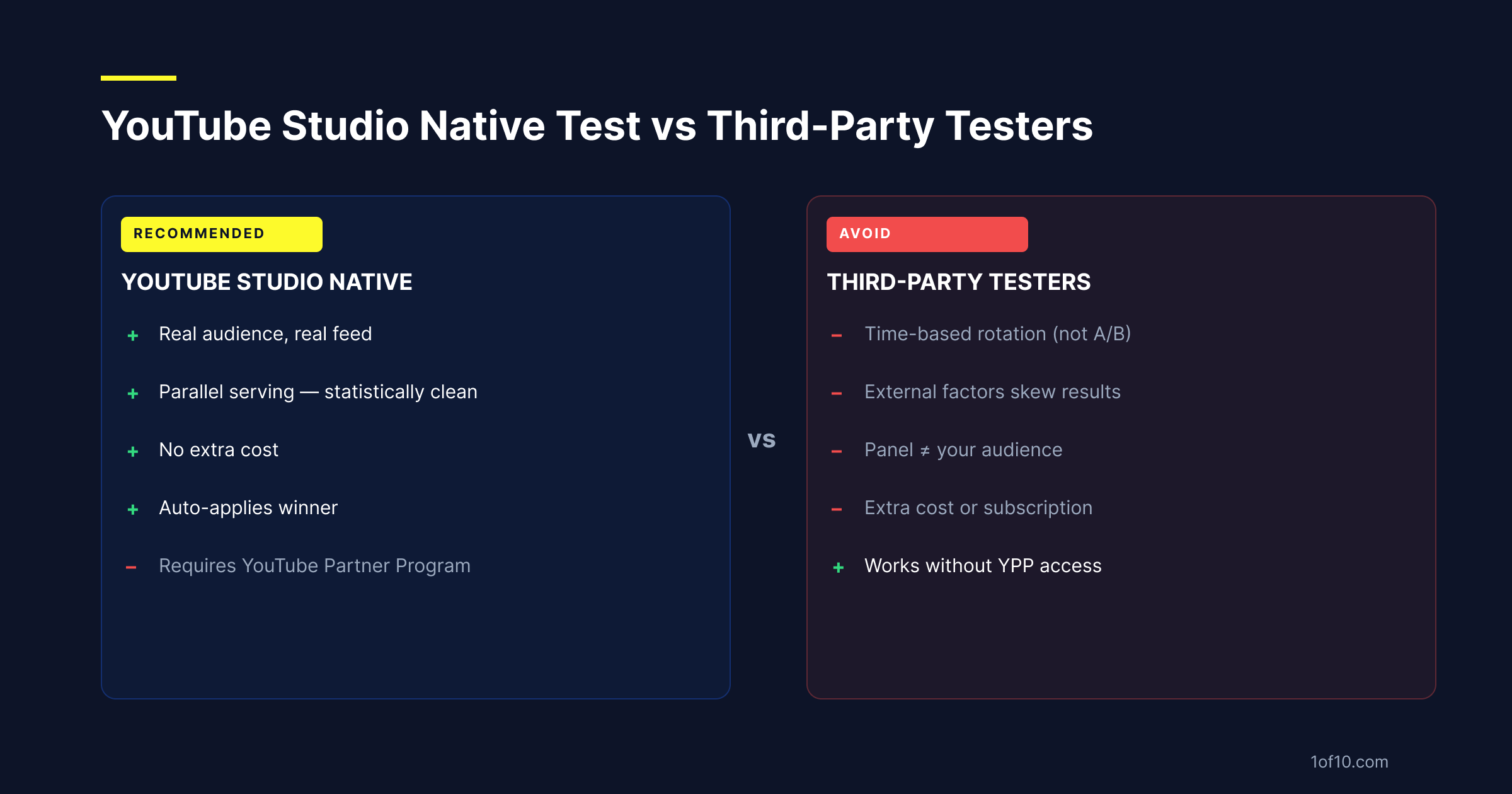
The core advantage over third-party tools: your viewers, your video, your data. Third-party thumbnail testing tools work by rotating thumbnails on a schedule (swapping every 24 or 48 hours) and comparing CTR across the rotation windows. This is time-based, not audience-randomized. External factors (day of week, time of day, what else got published in your niche) affect the results. YouTube's native A/B test serves all variants in parallel, which eliminates that noise.
Who has access and how to enable it
As of 2026, Test and Compare is available to channels that are in the YouTube Partner Program (YPP).
YPP eligibility requirements:
- 1,000 subscribers minimum
- 4,000 valid public watch hours in the past 12 months, OR 10 million valid public YouTube Shorts views in the past 90 days
- Active AdSense account linked
- No active Community Guidelines strikes
Channels outside YPP may see the feature in a limited rollout -- YouTube has been expanding access -- but the current primary gate is YPP membership. For the full monetization requirements and timeline, see the complete YouTube monetization guide.
If you're in YPP and don't see Test and Compare when you click a video's thumbnail in Studio, check: the feature may still be rolling out by region, or it may require a one-time opt-in in your Studio settings.
Step-by-step: how to set up a thumbnail A/B test in YouTube Studio
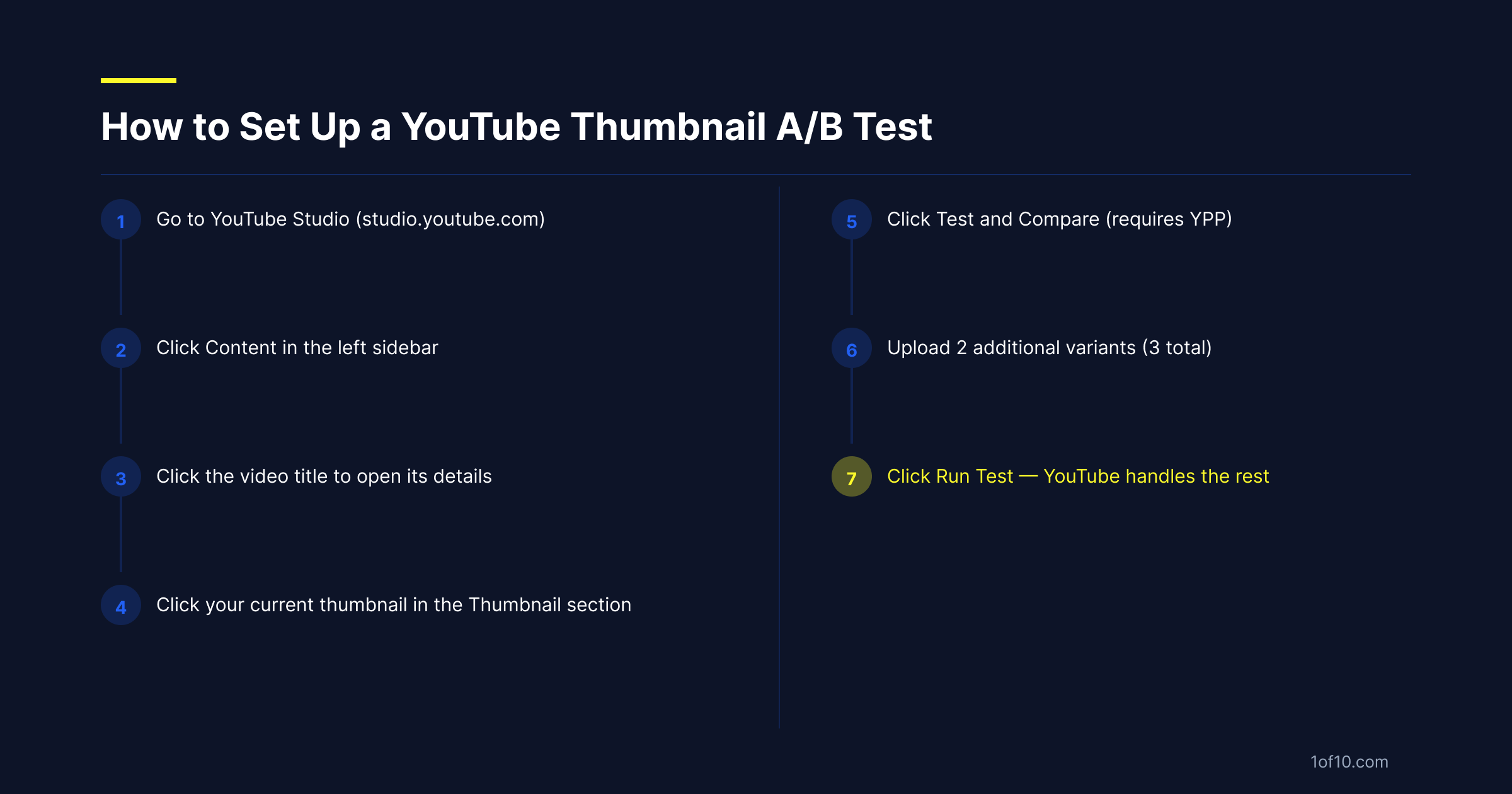
- Go to YouTube Studio and sign in
- Click Content in the left sidebar
- Click on the title of the video you want to test (not the thumbnail -- click the title to open video details)
- In the video details panel, locate the Thumbnail section
- Click your current thumbnail to expand the Thumbnail section options
- Click Test and Compare -- this option appears alongside "Upload thumbnail" if the feature is available on your channel
- You'll see your current thumbnail as Variant A. Click the upload areas to add Variant B and optionally Variant C (up to 3 variants total, including the original)
- Click Run Test
YouTube begins serving all variants to real viewers automatically. You don't need to do anything else during the test period.
To check results: go back to the video details page at any time. YouTube will show impression counts and CTR for each variant as data accumulates.
How long YouTube runs the test and how it picks the winner
YouTube's thumbnail tests run for approximately 1 to 2 weeks, though the actual duration varies. Two factors determine how long YouTube runs the test:
Your video's traffic volume. More impressions per day means faster statistical significance. A video with high search volume or strong algorithmic recommendation will reach significance faster than a slower video.
How close the CTR results are between variants. If one variant is clearly winning by a wide margin, YouTube reaches significance faster. If all three variants are getting nearly identical CTR, the test runs longer.
YouTube determines the winner based on click-through rate -- whichever thumbnail gets clicked the highest percentage of the times it's shown to viewers. When YouTube determines a statistically significant winner, you'll receive a notification, and depending on your test settings, YouTube may automatically apply the winning thumbnail or ask you to confirm.
You can end the test manually at any time from the video details page and apply any variant as the permanent thumbnail.
How to generate 3 test-ready variants in 30 seconds
The bottleneck in thumbnail A/B testing isn't the test itself -- it's creating 3 meaningfully different variants worth testing. If your variants are the same thumbnail with minor adjustments (slightly different text placement, a filter tweak), you're not generating useful test data. You're testing rounding errors.
Variants worth testing are meaningfully different on at least one axis. Understanding different thumbnail types and formats helps you choose axes that test different viewer psychology, not just different aesthetics:
- Different angle: pain framing vs. outcome framing vs. curiosity gap
- Different subject: face/reaction vs. object/result vs. action frame
- Different text strategy: text-heavy vs. single word vs. no text
- Different color palette: same composition, different dominant color (check what's winning in 2026 before picking your test palettes)
Creating 3 genuinely different thumbnails from scratch takes time. Using a design tool to produce 3 distinct compositions for each video isn't realistic at volume. If you're building variants from scratch, the guide to YouTube thumbnail fonts covers the building blocks that consistently appear in high-CTR thumbnails.
1of10 generates outlier-informed thumbnail variants based on what's proven to drive clicks in your niche. You describe the video, 1of10 generates variants aligned with the top-performing thumbnail patterns from your category. You get 3 meaningfully different test candidates in under a minute.
Generate 3 test-ready thumbnail variants at 1of10.com.
Why YouTube Studio's native A/B test makes third-party testers obsolete in 2026
Third-party thumbnail testing tools use two main methods, and both have significant flaws:
Time-based rotation. The tool swaps your thumbnail at set intervals (every 24 or 48 hours) and compares CTR across the windows. The problem: every time window is different. A thumbnail live on Sunday afternoon has a different audience composition, traffic volume, and competitive context than one live on Tuesday morning. You're not comparing the same conditions.
Panel testing. Some tools test your thumbnail against a mock audience panel before publication. This tells you which thumbnail a sample of people said they'd click. People in panels don't click the same way they do in a real feed, and the panel audience is not your specific subscriber and suggested-video audience. Understanding the psychology behind thumbnail clicks helps you design variants that test meaningful differences in viewer motivation.
YouTube's native test uses real viewers in real feed conditions, served all variants in parallel on the same video, in the same time window. This is statistically clean in a way that no third-party tool can replicate.
The remaining case for third-party tools: channels that aren't in YPP and don't have access to Test and Compare. For those channels, the manual rotation approach -- swapping thumbnails every 24 hours and comparing 48-hour CTR windows in YouTube Analytics -- is the best available fallback. It's noisy data, but it's real data on a real audience.
If you are in YPP, there is no reason to use a third-party thumbnail tester over YouTube's native tool.