
What is a Clickbait Thumbnail? (and How to Make Click-Worthy Thumbnails Instead)
What is a clickbait thumbnail, where's the line between click-worthy and misleading, and what does YouTube's policy actually say? A practical breakdown.
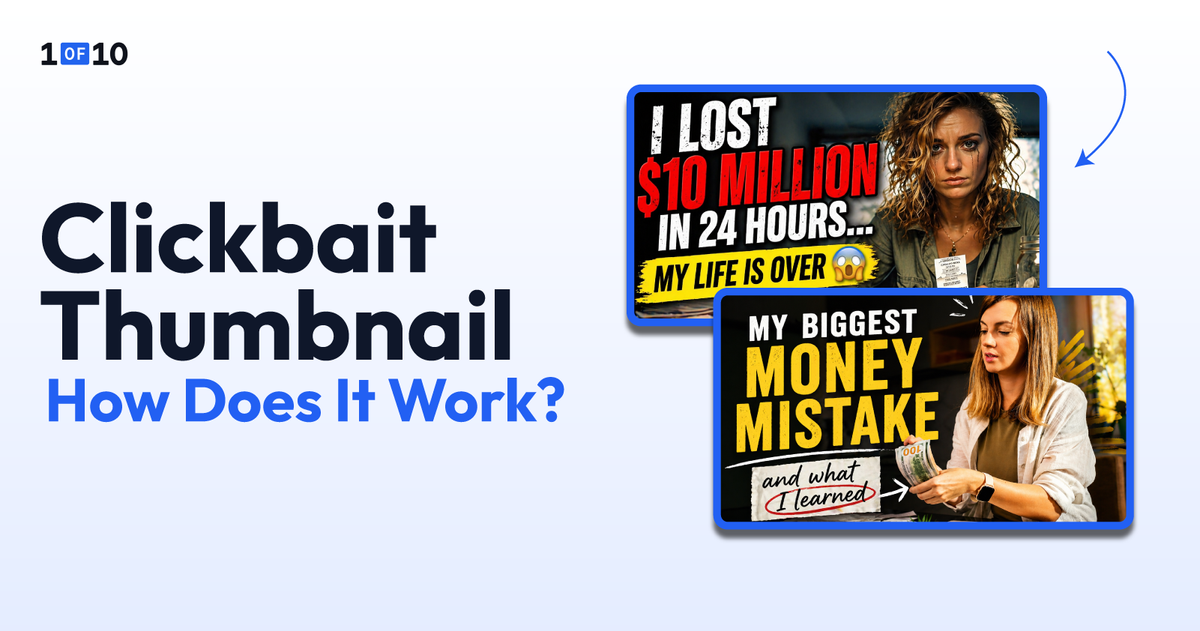
A clickbait thumbnail is a loaded term. It describes thumbnails built to get a click by any means: shocked faces, bold text, images that imply something dramatic happened.
The word carries a negative charge because misleading thumbnails erode viewer trust, tank retention, and now trigger enforcement under YouTube's updated policies.
But not every attention-grabbing YouTube thumbnail is clickbait. The most-watched videos on YouTube use thumbnails that are aggressively click-worthy: high contrast, emotional faces, bold text, open curiosity loops. They look intense.
The difference is that the video behind them actually delivers on the promise the thumbnail makes.
That distinction matters more in 2026 than it ever has. YouTube is actively removing videos with what it calls "egregious clickbait," where the title or thumbnail makes a promise the video doesn't keep.
Let's break down what YouTube's policy actually says, where the line sits between click-worthy and misleading, and how to design thumbnails that earn clicks without crossing it.
TL;DR: Clickbait vs. Click-Worthy Thumbnails
- "Clickbait" refers to misleading thumbnails that break the promise made to the viewer, which erodes trust and tank retention.
- "Click-worthy" thumbnails use high contrast, emotion, and bold text but deliver on the promise in the actual video content.
- YouTube actively enforces policies against "misleading thumbnails" and "egregious clickbait" that fail to deliver on the title or image.
- The primary rule is the delivery test: if the viewer clicks and gets what the thumbnail promised, it is click-worthy; if not, it is misleading.
- To create effective, click-worthy thumbnails, design the thumbnail first, then build the video (especially the intro) around delivering on its promise.
- Want to create high-performing thumbnails? Try 1of10's free AI thumbnail generator.
What is a Clickbait Thumbnail?
The word "clickbait" gets used in two different ways, and the distinction matters. One usage is strictly negative and lines up with how YouTube enforces its policies. The other is neutral creator shorthand for any thumbnail built to maximize clicks.
Both are worth pulling apart.
The Negative Definition: Thumbnails That Misrepresent the Video
In its strictest sense, a clickbait thumbnail is one that promises something the video doesn't deliver. The image or text implies specific content, a celebrity appearance, a shocking event, or a dramatic reveal that simply isn't in the video.
The viewer clicks, realizes they've been misled, leaves early, and may never return to the channel.
This is the definition YouTube uses when it refers to "misleading thumbnails" in its Community Guidelines. It's also the definition that matters most for creators, because it's the one that carries enforcement consequences.
The Neutral Definition: Thumbnails Engineered for Maximum Clicks
In everyday creator usage, "clickbait" also describes any thumbnail optimized for maximum click-through rate (CTR). Exaggerated facial expressions, curiosity-gap text, bold color contrast, and visual hooks designed to stop the scroll. These thumbnails are loud, intentional, and highly effective.
When the video behind them delivers, this isn't deception. It's packaging. Every successful YouTube channel operates this way.
The thumbnails that drive the highest CTR on the platform are almost always the ones that combine strong emotion with a clear curiosity gap. Whether that qualifies as "clickbait" depends entirely on whether the video follows through.
What Does YouTube's Policy Say About Clickbait Thumbnails?
YouTube addresses misleading thumbnails across three separate policies. Each one covers a different angle.
The Thumbnail Policy (Community Guidelines)
YouTube's thumbnail policy is direct: creators should not post "a thumbnail that misleads viewers to think they're about to view something that's not in the video." This falls under the broader Community Guidelines that apply to all content on the platform.
If a thumbnail violates this policy, here's what creators can expect:
- First-time violations typically result in a warning with an option to complete a policy training.
- If the same policy is violated again within 90 days, the channel may receive a strike.
- Three strikes within 90 days can lead to channel termination.
The Spam and Deceptive Practices Policy (Misleading Metadata)
YouTube's spam policy covers a broader category it calls "misleading metadata or thumbnails." This policy targets creators who use titles, thumbnails, or descriptions to trick viewers into believing the content is something it isn't.
Specific examples flagged by the policy include:
- A thumbnail with a picture of a popular celebrity that has nothing to do with the video content.
- Titles and thumbnails that lead viewers to believe they'll see content the video doesn't contain.
- Thumbnails that imply a newsworthy event recently happened when the video doesn't address that event.
The "Egregious Clickbait" Enforcement Update (December 2024)
In December 2024, YouTube announced strengthened enforcement against what it calls "egregious clickbait." YouTube defined this as titles or thumbnails that include promises or claims not delivered within the video itself, with a specific focus on breaking news and current events.
YouTube's own examples:
- A video titled "the president resigned!" where the video doesn't address the resignation.
- A thumbnail saying "top political news" on a video that contains no news coverage.
The safest path is building from formats that already performed without misleading anyone. Tools that generate video titles from proven patterns keep you on the click-worthy side of this policy.
YouTube began rolling out this enforcement in India first, with plans to expand. As of April 2026, YouTube has stated it will start by removing content that violates this policy without issuing a strike, to give creators time to adjust to the new enforcement standards.
Click-Worthy vs. Misleading: Where the Line Actually Sits
The policies above draw a legal boundary. But for creators, the practical question is simpler: how do you know if your thumbnail is on the right side of the line before you publish?
Two tests cover it.
The Delivery Test: Does the Video Pay Off What the Thumbnail Promises?
This is the only rule you need to memorize: if the viewer clicks and gets what the thumbnail promised, it's click-worthy. If they don't, it's misleading.
A thumbnail showing a shocked face next to a pile of broken electronics is click-worthy if the video actually contains a moment where something breaks. It's misleading if the video is a calm unboxing and nothing breaks.
The visual techniques can be identical. The difference is whether the video backs up the thumbnail's implied promise.
The Retention Test: Are Viewers Staying or Bouncing?
YouTube's algorithm runs the delivery test automatically, through viewer retention. When viewers click a thumbnail and leave within the first 30 seconds, the platform reads that as a signal that the packaging didn't match the content. Over time, videos with high CTR but low retention get fewer recommendations.
This is why misleading thumbnails hurt channels long-term even when they spike clicks short-term. A clickbait YouTube thumbnail might get the initial click, but if the viewer bounces, the algorithm reduces the video's reach. The channel's overall recommendation standing degrades over weeks and months.
Patterns That Are Click-Worthy
These patterns use high-impact visuals and curiosity gaps while accurately representing the video. None of them are misleading because the video delivers on the promise.
- Cooking Channel: The finished dish in dramatic close-up with one-word text ("PERFECT"). The video walks through the full recipe, and the dish turns out exactly as pictured. The thumbnail overpromises nothing.
- Tech Channel: A creator holding two phones with a question-mark overlay between them. The video is a direct head-to-head comparison of those exact two phones. The curiosity gap (which one wins?) gets closed in the video.
- Education Channel: A bold stat as text ("97% of people get this wrong"). The video explains the topic thoroughly, and the stat is real and sourced. The thumbnail amplifies a genuine hook.
Patterns That Cross the Line
These patterns use the same visual intensity but break the delivery test. The video doesn't contain what the thumbnail implies.
- A thumbnail showing a recognizable public figure's face on a video that never mentions or features that person. The face is there purely to borrow their audience's attention.
- A thumbnail with text saying "I'm quitting" on a video that's actually a product review with no mention of quitting anything. The emotional hook has no connection to the content.
- A thumbnail implying a physical confrontation (clenched fists, shocked bystanders) on a video that's a calm conversation. The visual narrative is fabricated.
- A thumbnail using a breaking-news graphic ("JUST ANNOUNCED") on a video that doesn't cover any news or announcement. This is the exact pattern YouTube's December 2024 policy update targets.
How to Make Click-Worthy Thumbnails Without Crossing the Line
Staying on the right side of the line isn't about pulling back on visual intensity. The most-clicked thumbnails on YouTube are loud, emotional, and unapologetic about it.
The work is in making sure the loudness is earned. Here's how.
Design the Thumbnail First, Then Build the Video Around It
The thumbnail is the single most important asset on a YouTube video. It's what decides whether anyone clicks at all, so it should lead the creative process, not follow it. Designing thumbnail-first forces you to commit to a clear, deliverable promise upfront, then engineer the video (especially the intro) to honor it.
Work in this order:
- Design the thumbnail first
- Identify the strongest, most honest hook the thumbnail can promise
- Build the video, especially the intro, to deliver on that hook
The catch is discipline. Thumbnail-first only works if the promise you're designing is one that the video can actually deliver.
Before locking in the design, write a single sentence describing what the video will contain. If you can't write that sentence, the thumbnail is a fiction and the design needs to change, not the video. It also helps to generate video ideas with strong built-in hooks, so the promise and the content are aligned from the start.
The thumbnail should be the most compelling frame of the truth, not a fiction the video has to live up to.
Use Curiosity Gaps That the Video Actually Closes
A curiosity gap is the space between what the thumbnail shows and what the viewer needs to watch the video to find out. It's the most effective click-driving technique on YouTube, and it's completely ethical when the video closes the loop.
"What happened next?" works if the video shows what happened next. "You won't believe the result" works if the result is genuinely surprising.
The gap creates the click. The closure creates trust. Open loops without closures are the textbook definition of misleading clickbait.
For a step-by-step walkthrough of thumbnail creation, see the guide on how to make a YouTube thumbnail.
Train Your Eye on What Worked, Not What Looks Flashy
The best click-worthy thumbnails aren't the flashiest ones. They're the ones that actually drove sustained views and viewer retention on YouTube. There's a meaningful difference between thumbnails that look aggressive and outlier thumbnails that performed.
Misleading thumbnails don't become outliers. They might spike clicks on day one, but retention collapses, the algorithm pulls back recommendations, and the video underperforms its channel average within a week.
Outlier videos, the ones that outperform a channel by 10x or more, consistently have thumbnails where the packaging matched the content. High CTR and high retention together. Studying these outliers is also the best way to find niche opportunities where honest, click-worthy packaging is enough to win.
This is why tools trained on YouTube outlier data produce click-worthy thumbnails by default. The training data itself filters out misleading patterns, because those patterns don't sustain performance.
1of10's AI thumbnail generator is trained on outlier data from 62 billion YouTube views. It produces finished, production-ready thumbnails that reflect what actually worked on the platform, not generic image generation. For creators who want high-CTR thumbnails without guessing where the line is, outlier-trained AI handles that calibration by default.
Try 1of10's free AI thumbnail generator. No credit card, 60 credits included.
Make Thumbnails That Earn Clicks and Keep Viewers
The goal isn't to avoid attention-grabbing thumbnails. It's to make thumbnails where the attention is earned and the promise is kept. Every successful channel on YouTube operates in that space.
If you want finished thumbnails trained on what actually performed on YouTube, not on what looks flashy in isolation, try 1of10's AI thumbnail generator. 60 credits, no credit card, and outputs built on outlier data from 62 billion views.
FAQs About Clickbait Thumbnails
Is Clickbait Allowed on YouTube?
It depends. Thumbnails designed to attract clicks through strong visuals and curiosity gaps are fine. Thumbnails that misrepresent the video content violate YouTube's Community Guidelines and spam policies. YouTube specifically prohibits thumbnails that mislead viewers about what the video contains.
What Happens if You Use a Misleading Thumbnail on YouTube?
YouTube may remove the thumbnail and issue a warning or strike. Three strikes within 90 days can result in channel termination. Under the December 2024 "egregious clickbait" enforcement update, YouTube may remove the video itself, initially without a strike to give creators time to adjust.
How Do You Make a Thumbnail That Gets Clicks Without Being Clickbait?
Design the thumbnail around the video's actual payoff, not around a fictional hook. Use curiosity gaps that the video closes. Use high-contrast visuals and expressive faces when they reflect real content. Apply the delivery test: if the viewer clicks and gets what the thumbnail promised, it's click-worthy.
Can You Get Banned for Clickbait on YouTube?
Yes, in extreme cases. Three Community Guidelines strikes within 90 days can result in channel termination. Misleading thumbnails are explicitly covered under YouTube's thumbnail policy and spam/deceptive practices policy. Repeated violations escalate from warnings to strikes.
What is the Difference Between Clickbait and a Good Thumbnail?
A good thumbnail earns the click and delivers on the promise. Clickbait earns the click and breaks the promise. The visual techniques, bold colors, expressive faces, curiosity-driven text, can be identical in both cases. The difference is whether the video behind the thumbnail follows through.
Related: The Definitive Guide to Ethical Clickbait: How to Lie Truthfully